Sendspin implementation guide
Every chapter of the guide, in reading order. Your browser's print dialog saves it as a PDF.
- Sendspin implementation guide
- How Sendspin works
- Roles and the products they make
- Worked use cases
- Building a client step by step
- Pairing on the device
- Build with ESPHome
- Building a server step by step
- What users expect from a server
- Pairing and encryption explained
- Testing and certification
- Contributing and governance
Sendspin implementation guide
Sendspin is an open protocol for playing music in sync across the devices in a home: speakers, amplifiers, screens, lights and the apps that control them. The protocol specification defines exactly what goes over the wire. This guide covers the components you need, the user experience, and the implementation choices the protocol leaves to you.
The guide is non-normative. Where it restates a rule, the specification is the authority and the text links to it. Where it gives advice, that advice comes from the people who wrote the specification and shipped the first implementations.
Definitions
A client is an endpoint that receives audio from an existing Sendspin server. With the source role it can also hand its own audio to that server, which distributes it to other clients. Speakers, amplifiers, streamers, displays and lights are clients.
A server sends audio to clients and keeps them in sync. It can also reroute the audio of a source client to other clients. A server can be an app on a phone or desktop, or part of a music server such as Music Assistant.
One device can be both. A set-top box plays music as a client and can at the same time be a server that sends TV audio to the speakers in the room. The concepts chapter explains how the pieces fit together.
Choose your implementation path
You make devices
For speakers, amplifiers, streamers, displays and lighting, implement the client side with the C++ SDK or ESPHome.
You make software
A music player, desktop or mobile app, or streaming bridge can be a client, a server, or switch between the two depending on what the user is doing.
You run a platform
For a music server, home automation hub or multi-room system, implement the server side and the interface for pairing and groups.
Where the protocol stands
Sendspin 1.0 is at Release Candidate 1. The protocol is frozen: between now and the final release only clarifications and corrections land, and a behavioural change would start a new release candidate. What you build against RC1 today will work with 1.0. The contributing chapter explains the release process, and the specification's own governance document is the reference.
Implementing the protocol is free. There are no royalties and the specification comes with a patent license from every contributor. The Sendspin name and logo are trademarks, and using them on a product goes through the partner program. Licensing and trademarks has the details.
How to read this guide
- The first chapters introduce the terminology and common product designs.
- Building a client and Building a server walk through the work in order, pointing at the specification and the SDK hooks as they go. Read the side you are building; skim the other to understand your counterpart.
- Security explains pairing and encryption in plain language, for the people who need to sign off on them.
- Ship it covers testing, certification and how to take part in the project.
Read the whole guide on one page or save it as a PDF from there.
Getting help
Ask implementation questions in the #sendspin-protocol channel on the Music Assistant Discord. For partnership and certification questions, email [email protected]. Issues with the specification itself go to the spec repository.
How Sendspin works
This chapter introduces clients, servers and the connections between them. Each section ends with a link to the part of the specification that defines it.
Clients and servers
A client is an endpoint on the network. It receives audio from a server, or, with the source role, captures audio and hands it to a server. A client is a speaker, an amplifier, a streamer, a wall display, a light, a browser tab, a CLI player on a Raspberry Pi.
A server decides what plays where, encodes a stream for every client, keeps them on one timeline and manages groups, volume and metadata. The server is the only place where audio is mixed, resampled or transcoded. Music Assistant is a server. A phone app that streams the music it plays to the speakers in the room is a server too.
A role is a capability a client opts into: player receives audio, controller sends transport commands, metadata shows what plays, and so on. A client advertises the roles it supports; the server activates the ones it wants to use. Every server implements every role. The roles chapter goes through them one by one.
One device can be both a client and a server, and support several roles. A set-top box is a player when music plays, a source when it feeds TV audio into the system, and can embed a server to drive the other speakers in the room itself.
Keep clients simple
Most design decisions in Sendspin push complexity to the server. Clients announce what they can do and the server adapts: it picks the codec per client, resamples for clients that cannot, and lets every client in a group use a different format. This lets microcontrollers and desktops play together.
Spec: Definitions, Role Versioning.
A session, end to end
sequenceDiagram
    participant C as Client
    participant S as Server
    Note over C,S: mDNS discovery, WebSocket connect
    Note over C,S: Noise handshake (always encrypted)
    S->>C: server/hello
    C->>S: client/hello (roles, capabilities)
    S->>C: server/activate (which roles, playback or pairing)
    loop every few seconds
        C->>S: client/time
        S->>C: server/time
    end
    C->>S: client/state (available: true)
    S->>C: stream/start (format for this client)
    S->>C: audio chunks with server timestamps
    S->>C: server/state (metadata, colors, controller state)
    C->>S: client/command (play, pause, next...)
    S->>C: stream/end
    C->>S: client/goodbye (reason)
Everything after the handshake is JSON text messages for control and small binary messages for audio, artwork and visualizer data, all inside one WebSocket connection.
Spec: Protocol overview, Communication.
Discovery and connection
Both sides announce themselves with mDNS. In the recommended setup the server connects to the client: the client advertises _sendspin._tcp with a small WebSocket server, and every server on the network finds it and connects. Clients can also do it the other way around and connect to a server advertising _sendspin-server._tcp. Servers support both; a client picks one.
Server-initiated connections are the only mode with defined behaviour when there is more than one server on the network. A client can be connected to several servers at once but takes playback from one at a time. A server that is playing outranks one that only wants to be connected, a pairing attempt is never interrupted, and the client remembers the server it last played from. Two servers in one home, say Music Assistant and a phone app, therefore cooperate without any configuration.
The WebSocket itself is plain ws://. All confidentiality comes from the layer inside it.
Spec: Establishing a Connection, Multiple servers.
Encryption and identity
Every Sendspin connection is encrypted with the Noise protocol framework (pattern KKpsk2, X25519 keys, ChaCha20-Poly1305 or AES-GCM). There is no unencrypted mode.
Each client and each server has a long-lived keypair. The public key, encoded as text, is the client_id or server_id. It is the device's identity, so it is created once and persisted for the life of the device. Replacing the key means becoming a different device as far as everyone else is concerned.
The handshake mixes in a pre-shared key. Which key is used tells both sides how much they trust each other:
- A long-term PSK from a previous pairing: both sides know exactly who the other is. This is a paired session.
- The device's pairing PSK: the server was handed the device's secret out of band, typically by an automated flow such as Home Assistant passing it to Music Assistant, so the two can pair without anyone typing a code.
- The published Sentinel PSK: nobody has proven anything yet. This is an unpaired session, good enough to play music on a speaker if the manufacturer allows it, and the starting point for code-based pairing.
Spec: Encryption, Pre-Shared Key.
Pairing and unpaired access
Pairing is the one-time step that turns an unpaired session into a paired one. A user meets two methods: a dynamic pairing code the device displays, speaks or shows in the vendor's app during the attempt, and a static pairing code printed on devices that have no way to show one. The third method, the pairing PSK, is for automated hand-offs between systems, such as Home Assistant passing an ESPHome device's secret to Music Assistant, or one server provisioning another. Servers implement all three; clients implement the pairing PSK and add the one code method that fits their hardware.
Pairing is not required to play music. A client can admit unpaired access, which users know as guest mode: any server the operator approves may play on it, exactly like a cast target in the home today. Whether a device ships with unpaired access on is the manufacturer's call. Devices with a microphone or another privacy-sensitive input should ship with it off, and the source role always needs explicit approval from the operator before anything leaves the device.
The trust model chapter explains the security properties. The client pairing and server UX chapters cover what to build.
Spec: Pairing, Unpaired Access.
Time
Every audio chunk carries the server-clock time at which it must come out of the speaker. Clients keep a continuous estimate of the server clock by exchanging small time messages and feeding the results into the time filter, a two-dimensional Kalman filter that tracks offset and drift. The filter is mandatory and there is a reference implementation you can use as is.
Because every client translates the same server timestamps to its own clock, a dozen speakers of different makes play the same sample within a fraction of a millisecond of each other. A player reports itself as available only once its filter has converged. It then measures the error at the output, corrects it inaudibly, and drops audio that arrives too late.
Spec: Clock Synchronization, Playback Synchronization.
Streams, chunks and buffers
For each client with an active player role the server opens a stream: a format (codec, sample rate, channels, bit depth) chosen from what that client supports, followed by chunks of 15 to 150 ms of encoded audio, each with a timestamp. A client tells the server how much it can buffer and how far ahead it needs audio to start cleanly and to ride out network jitter. The server sends as far ahead as the buffer allows for music from a library, and as little ahead as it can for live input such as a turntable or a TV.
The queue is one continuous stream. Track changes do not restart it, which is what makes gapless playback and crossfades work. A seek or a jump to another track clears the buffer and the stream continues from the new position.
Spec: stream/start, Server Audio Send Constraints.
Groups
Every client is in exactly one group at all times, even if it is alone in it. A group has a playback state, a volume and a mute state, and its members play the same audio. Grouping is a server-side concept: clients only see group/update messages telling them which group they are in and what it is doing. A controller client sends its commands to its own group; a switch command moves it to the next group that is playing.
When something else takes over a device, say the user switches the TV to HDMI, the client either leaves the group (if Sendspin could still take it back any time) or reports itself unavailable (if it will not yield). The server parks it in its own stopped group and remembers where it came from, but never pulls it back in on its own.
Spec: group/update, External Source Handling, Switch command cycle.
Versioning and evolution
Roles are versioned (player@v1) and evolve independently of the protocol as a whole. A client lists the versions it supports, most preferred first, and the server picks the newest one it implements. Everyone ignores fields and messages they do not know, which is how the protocol gains features without breaking what already ships. Behaviour only changes when both sides have explicitly agreed to it through role activation or a declared capability.
You can add your own roles under a _vendorname_ prefix for features specific to your products, and the project uses the same mechanism to try out draft roles before they enter the specification.
Spec: Role Versioning, Protocol evolution, Application-Specific Roles.
Glossary
| Term | Meaning |
|---|---|
client_id, server_id |
The public half of a device's identity keypair, as text. Stable for the life of the device. |
| Pairing record | A long-term PSK stored with the peer's id after a successful pairing. Clients hold at least five. |
| Pairing PSK | A secret the device is manufactured with (or generates on first boot), distributed together with its client_id as a pairing token. Used by automated pairing flows, not by people. |
| Pairing token | The text or QR form of the pairing PSK, starting with SP:, as one system hands it to another. |
| Sentinel PSK | A published constant used when no trust exists yet. Marks a session as unpaired. |
| Out-channel | The way a device shows a dynamic pairing code to the person standing next to it: a display or a speaker. |
| Activity | What a server declares it wants from a connection: playback, pairing, or nothing yet. Decides priority between servers. |
| Unpaired access | A client's willingness to let approved servers play on it without pairing. |
| Group | The set of clients playing the same thing. Each client is always in exactly one. |
| Send-ahead | How far before its timestamp the server transmits a chunk. Derived from the clients' buffer requirements. |
| Output delay | The fixed delay a client adds for everything after its audio port, such as an external amplifier. |
Roles and the products they make
A role is a capability a client offers. The client lists the roles it supports in its hello message, the server activates the ones it wants, and from then on each role has its own messages and, where needed, its own binary stream. Servers implement every role, so choose the roles your product needs.
The seven roles
| Role | What it does | What the device needs | Typical products |
|---|---|---|---|
player |
Receives timestamped audio and plays it in sync. Owns its volume, mute and output delay. | An audio output, a decoder for FLAC or PCM (Opus optional), a clock, a few hundred kilobytes of buffer. | Speakers, amplifiers, streamers, soundbars, set-top boxes, desktop and mobile apps. |
source |
Captures a local input and streams it to the server, which distributes it. | An audio input. The server does the resampling and mixing. | Turntable and AUX bridges, Bluetooth receivers, TVs and set-top boxes forwarding their audio, microphones. |
controller |
Sends play, pause, next, volume, mute, repeat, shuffle, seek and switch for its group, and receives the group's state. | A way for the user to act: buttons, a knob, a touchscreen, a voice assistant. | Remotes, wall panels, knobs, any player with buttons on it. |
metadata |
Receives title, artist, album, progress and the like, including updates scheduled for the next track. | Something to show text on. | Wall tablets, displays on speakers, car head units, companion apps. |
artwork |
Receives images in exactly the size and format it asks for, on up to four channels. | A screen and a JPEG or PNG decoder. | Displays, speakers with a screen, e-ink frames. |
visualizer |
Receives loudness, beat, spectrum and peak events timed to the audio. | Lights or a screen, and the time filter. | Light strips, LED matrices, lamps, visualizer screens. |
color |
Receives a small palette derived from the artwork or the music, with guaranteed contrast. | Anything that can show a colour. | Ambient lighting, UI theming on displays. |
Spec: Role Versioning, and one section per role from Player messages onwards.
How they combine
Most products use more than one role.
- Speaker or amplifier:
playerpluscontroller, so the buttons on the device act on the group it is in. Addsourceif it has a line input. - Streamer (output only):
playeralone, orplayerpluscontrollerwhen it has a remote or an app. - Display:
metadataplusartworkpluscontroller. Addcolorto theme the interface after the album art, andplayerif the display has a speaker. - Lighting:
visualizerfor music-reactive effects,colorfor ambient colour, or both. - Dedicated controller:
controlleralone. A knob, a button panel or a voice satellite that only needs to control the room it is in. - Input bridge:
sourcealone, for a turntable, a mixer or a Bluetooth receiver that feeds audio in.
One client per audio output
A device with several independent outputs, say a two-zone amplifier, should present itself as one client per output. Each client gets its own identity, group, volume and timing parameters. The two time filters run off the same host clock, so the device can also sum two streams onto one physical output.
Things every role shares
Whatever roles you pick, the client needs the same foundation: a stable identity, the Noise handshake, the time filter, the hello and activate exchange, and the ability to report whether it is available. The client chapter covers these shared components.
The server activates and deactivates roles over the life of a connection. A client keeps per-role state only while the role is active and starts clean when it is activated again.
Roles that do not exist yet
The specification deliberately leaves out things that are better done by the server or that are not ready. Announcements and chimes, lyrics, playlists and native source selection have all been discussed and may arrive as new roles. A new role never breaks existing clients, because clients only see the roles they asked for. If you need something now, prototype it as a _vendorname_ role and bring the experience to the spec repository; see contributing.
Worked use cases
Each case names the roles involved, how the device connects, which pairing method fits, and the things that usually go wrong. Find the one closest to your product and read it before the step-by-step chapters.
Smart speaker or amplifier
Roles: player, controller; source if it has a line input.
- Server-initiated connection; the device advertises itself and any server in the home can use it.
- Pairing: a dynamic code spoken through the speaker if it has no display, otherwise shown on the display.
- Decide whether unpaired access is on by default. For a plain speaker it usually is: the user expects to pick it in the app and hear music.
- Set the output delay for anything after the port, such as an external amplifier, and let the user adjust it.
- Start with ESPHome for ESP32 designs, sendspin-cpp for anything else.
Streamer, output only
Roles: player, plus controller when there is a remote or an app.
- A network streamer or a DIY board: no speaker of its own, feeding a DAC, an amplifier or an optical input.
- The DAC, DSP and amplifier behind the port add delay the device cannot see. Measure it once and ship it as the default output delay; expose it in settings.
- Pairing: a dynamic code shown in your app if you have one, otherwise a static code printed on the device, entered while a button press opens the pairing window. Most users will use guest mode.
- Report hardware volume knobs as read-only when they cannot be set remotely.
- Sendspin can run next to AirPlay and Cast on the same box. While another protocol is playing, leave the Sendspin group but stay available, so the user can take the device back with Sendspin at any time. Report it unavailable only if it will not yield.
Wall tablet or display
Roles: metadata, artwork, controller; color for theming; player if it has a speaker.
- Ask for artwork in exactly the pixel size you render; the server scales for you. Use a second channel for a blurred background.
- Scheduled metadata lets you show "up next" before the track changes.
- Pairing: show a dynamic code or a QR code on the display.
- A controller acts on the group the display is in. Give the user a way to switch groups.
- Start with sendspin-js for web-based panels, sendspin-cpp for embedded displays.
Dedicated controller
Roles: controller only.
- A knob, a button panel, a remote or a voice satellite that controls the room it is in without playing anything itself.
- It receives the group's state, so a ring of LEDs can show volume and play state.
- Pairing is rarely worth the friction here; unpaired access with operator approval is the usual choice.
- Play with nothing queued resumes what the group last played, so a single button is enough.
Lighting and visualizers
Roles: visualizer, color, or both.
- Visualizer frames are timestamped like audio. Run the time filter and render each frame at its time, not on arrival.
- Ask only for the data types you use, at the rate you can render. Beat events may be absent on servers without beat detection; peaks are always there.
- Colors come with contrast guarantees, so the same palette drives both the lamp and any text overlay.
Set-top box or TV
Roles: player, source, optionally an embedded server.
- As a player it joins the speakers for music. As a source it feeds TV audio into the system so the room's speakers play the film.
- Never pass the TV audio to the local speakers directly while sending it to the system: the local output would run ahead of the network. A device that is source and player plays only what the server sends back.
- When the user switches to a game console or another input, leave the Sendspin group but stay available if Sendspin may interrupt, or report the player unavailable if it must not. Either way the server parks it and never pulls it back on its own.
- An embedded server lets the box drive the room on its own, without a music server in the house. See the app case for how client and server mode coexist.
Turntable, AUX or Bluetooth bridge
Roles: source.
- The device captures, timestamps and sends audio. The server resamples and mixes.
- Report line sense when you can detect signal; the server can start the room when the needle drops and stop it when the record ends.
- Timestamp from the time filter including drift, not offset alone, or the stream wanders over an evening.
- After a network stall, drop the backlog and resume from live capture instead of bursting old audio.
- A source always requires explicit operator approval on the server, and devices with a microphone should ship with unpaired access off.
Desktop or mobile app
Roles: player and controller as a client; a full server when the app plays.
- Idle, the app is a client: it shows up as a target for Music Assistant or any other server in the home.
- When the user starts playback in the app, it becomes a server and sends to the other speakers. Say goodbye to the server you were a client of with reason
another_server, and advertise_sendspin-server._tcpas well so client-initiated devices find you. - Clients listen on 8928 and servers on 8927 by convention, so both can run on one machine.
Software player or music server
Roles: server, client, or both.
- A software music player, a Linux audio box, a home-automation hub: add the server side to send its output to Sendspin devices, add the client side to be a target for other servers, or do both.
- Reuse aiosendspin if you are in Python; it is the server inside Music Assistant.
- Your server identity key must survive backups and migrations, or every device will treat the restored server as a stranger.
- The server UX chapter covers discovery, approval and pairing.
Several servers in one home
Roles: any; this is about coexistence.
- Music Assistant, a phone app and a set-top box can all be servers at once. Server-initiated connections make this work without configuration.
- A client holds one playback connection. A server that starts playing takes it; the one that loses it gets
another_server, keeps showing the device as available, and does not reconnect in a loop. - Each server pairs separately. A client stores at least five pairing records.
- Show the hand-over as "playing from somewhere else" in your server UI.
Picking a connection mode
Use server-initiated connections unless you have a reason not to. The client advertises itself, servers find it, and the multi-server rules above are defined. Client-initiated connections exist for scripts, test tools and software that already has a server picker of its own; what happens with two servers is then up to you.
Picking a pairing method
| Your device has | Offer |
|---|---|
| A display | Dynamic pairing code, as digits and as a QR code |
| A speaker but no display | Dynamic pairing code, spoken |
| An app of its own | Dynamic pairing code shown in the app, which acts as the device's display |
| None of these | Static pairing code printed on the device, entered while a button, a pinhole or a power-cycle pattern opens the pairing window |
| A platform that already knows the device | The platform hands the device's pairing PSK to the server, the way Home Assistant does for ESPHome devices |
Offer one code-based method, not both, so the user never has to choose between them. Every client also implements the pairing PSK method for automated hand-offs between systems. A speaker with guest mode on plays for any server the operator approves, so many users will never need to pair. The client pairing chapter has the details.
Building a client step by step
Build a client in the following order. Each step links to the relevant specification rules and SDK hooks. See the pairing chapter and the roles chapter for details.
1. Pick an SDK
Choose an SDK for your platform:
- sendspin-cpp is the C++ library for devices. It runs on ESP32 through the ESP-IDF component registry (
sendspin/sendspin-cpp) and on Linux and macOS hosts. You add the roles you need when you set up the client, and roles you never use can be left out of the build to save flash. You provide anon_audio_writecallback, a network-ready provider and a persistence provider; the library hosts the WebSocket server and does Noise, decoding and time sync itself. - aiosendspin is Python. It is the server inside Music Assistant; its client side is mainly a test and reference client.
- sendspin-js is TypeScript for browsers and is being updated to spec 1.0.
Whatever you pick, install sendspin-cpp-cli on a Raspberry Pi or a Mac first. Use it as a reference player to compare against yours. The SDK page lists everything. If you are on ESP32, read the ESPHome chapter before writing any code.
2. The components
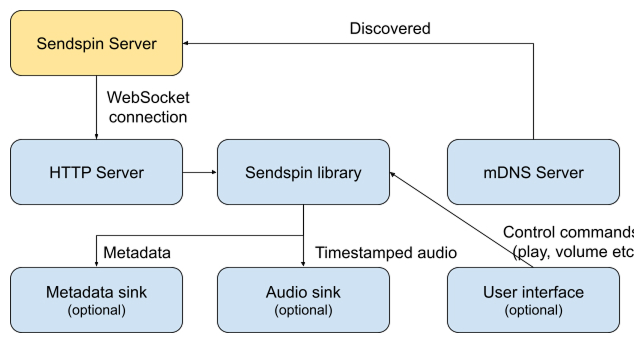
A client has four components: an mDNS advertisement (_sendspin._tcp with the path TXT record), a small WebSocket server for servers to connect to, the Sendspin core (handshake, messages, time filter), and your sinks: the audio output, and a display or lights if you have them. The SDK is the core and, in sendspin-cpp, the WebSocket server; the advertisement and the sinks are yours.
Spec: Server Initiated Connections, Encryption.
3. Identity and what to persist
Decide on persistent storage before anything else, because several things must survive a reboot:
- The X25519 keypair. The
client_idis derived from it, so regenerating the key makes the device a stranger to every server that knew it. - Pairing records, at least five. When all slots are full, evict the least recently used; a pairing never fails for lack of space.
- Volume and mute.
- Output delay, one per output if the output can change.
- The pairing failure counter (see rounds).
- The last-playback server_id, which decides between two idle servers.
In sendspin-cpp all of this goes through your SendspinPersistenceProvider.
Spec: Identities, Pairing Records, Multiple servers.
4. Announce what you can do
client/hello is where the server learns what it is talking to. List your roles in preference order. List formats with flac or pcm present so every server can serve you; Opus is optional and carries third-party patent licensing for commercial hardware. A player that cannot switch sample rates without a gap should list one rate and let the server resample. Fill in device_info with manufacturer, model and firmware version. Send the MAC address only when you have a deliberate reason: it is a stable identifier. Add a name, your current unpaired_access setting and the pairing methods you offer.
Spec: client/hello, player@v1 support object.
5. Let the clock converge before you say you are available
Run the time filter from the moment the connection is up. The reference implementation is a Kalman filter you can use as is, and a burst of about eight time exchanges every ten seconds is the known-good baseline. Do not report available: true until the filter has converged; a player that starts early plays out of sync and then corrects audibly. sendspin-cpp runs the filter for you.
Spec: Clock Synchronization.
6. Report timing parameters honestly
Two numbers in your player state tell the server how far ahead to send. required_lead_time_ms is measured from the start trigger to the first chunk you can play in full; it is often lower for a stream/clear on a warm pipeline than for a cold stream/start, and you may lower it while a stream runs. min_buffer_ms comes from the upper tail, around the 95th percentile, of the arrival-delay distribution, measured over a window long enough to include interference, and debounced so it does not jump on every blip. Report the lowest values that reliably avoid underruns. Padding these numbers adds latency for every listener, which is especially noticeable with live sources such as a turntable or a TV.
Spec: client/state player object, Server Audio Send Constraints.
7. Set the static output delay
Everything after the point where you measure playback (DSP, amplifier, DAC chain, external speakers) that you know about goes in as a default output_delay_ms. Let the user adjust it between 0 and 5000 ms, persist it, and keep separate values if the output can change. Delays before the port, such as your own audio buffers, are yours to compensate internally. Decreasing the delay can temporarily leave more audio buffered than you advertised; stay operational and drop quietly if you must.
Spec: client/state player object.
8. Stay in sync
Measure the error at the output against the time filter's prediction, not against arrival time. Corrections must be inaudible, playback speed must stay within ±0.5%, the error must stay within ±1 ms and you should aim for ±0.5 ms. Drop chunks that are already late. Snap to position in one shot on startup and after an underrun instead of sliding in. The specification describes a sample drop and insert strategy that needs no interpolation and suits small CPUs; ASRC is the higher-quality alternative when you have the cycles.
Chunks that are partly late
When a chunk's start is already in the past but its tail is still playable, decoding it and dropping only the late prefix keeps the codec state continuous. Discarding the whole chunk is simpler but costs more audio.
In sendspin-cpp your on_audio_write callback receives corrected PCM; the library does the measurement and correction.
Spec: Sync Accuracy, Correction Quality, Suggested correction strategy.
9. Volume
Volume is perceived loudness. Convert it to amplitude with (volume / 100)^1.5 and apply changes over a short ramp. Mute is independent of volume: a volume command never unmutes. A hardware knob you cannot drive remotely is reported in state but left out of supported_commands, so the server shows it read-only.
Spec: Player messages, client/state player object.
10. Yield to and reclaim from other sources
Report available: false only while you will not yield: HDMI in use, a Bluetooth session, another protocol owning the output. If Sendspin could take the device back at any moment, stay available and send client/leave instead so you stop taking part in the group. Keep processing stream/start, stream/clear and stream/end while unavailable; they may have crossed your update on the wire. A device that is also a source, such as a TV, never plays its own input locally; it plays only what the server sends back.
Spec: External Source Handling, Source messages.
11. Disconnect politely and reconnect sensibly
Send client/goodbye with the reason that fits: another_server when you switch, shutdown when you power off, restart when you will be back, user_request when the user disconnected you. On server-initiated setups the server reconnects. On client-initiated setups, after a lost connection reconnect with exponential backoff, starting at one second and doubling to a 30 second cap, with no limit on retries. Back off after a Noise failure too.
Spec: client/goodbye.
12. Power an attached amplifier from playback state
group/update tells you whether your group is playing. Switch the amplifier on when it is and off after a vendor-chosen idle time.
Spec: group/update.
13. Factory reset
A factory reset restores what you manufactured the device with (identity keypair, pairing PSK, static pairing code, calibrated output delay) and clears everything accumulated since, pairing records included.
Spec: Definitions.
14. Before you ship
- Identity survives a reboot and a power loss.
- Pairing records survive a reboot.
- The player converges before it reports available.
- No audible warble at startup or after a seek.
- Stays within ±1 ms of a reference player (sendspin-cpp-cli) over an hour.
- Survives a server restart and a network drop, and comes back without help.
- Output delay persisted and adjustable.
- Volume curve follows the formula; mute and volume are independent.
- Passes the conformance suite.
- Trademark use checked against licensing and trademarks.
Pairing on the device
Pairing is the one-time step that turns an unpaired connection into one where both sides know exactly who the other is. It is optional for playback: a speaker can admit unpaired access, which users know as guest mode, and play music for any server the operator approves. It is required before a server will activate the source role on an unauthenticated device, and it is what lets a server trust your device after the setup phase. This chapter covers the client side; the trust model explains why it is built this way, and the server UX chapter covers what the operator sees.
From the user's point of view there are three ways a device joins a server: guest mode, a dynamic PIN the device shows, speaks or displays in your app, or a static PIN printed on the device. Keep automated pairing out of this menu.
Choose the code method for your hardware
You offer exactly one code-based method, chosen by where the device can show or say a code.
| Your device has | Offer |
|---|---|
| A display | Dynamic pairing code, as digits and as a QR code |
| A speaker but no display | Dynamic pairing code, spoken |
| An app of its own | Dynamic pairing code, shown in the app; the app is the device's display |
| None of these | Static pairing code printed on the device, behind a pairing window opened by a button, a pinhole or a power-cycle pattern |
Never list both code methods. The server would have to ask the operator which one to use, and the operator has no way to know. A vendor app counts as a display: the device generates the code as usual and the app shows it, which also covers devices that gained Sendspin in a firmware update and have no code on their label.
Spec: Methods, pair-method descriptor.
The pairing PSK is for automation
Every client also implements the pairing PSK method for automated pairing between systems: Home Assistant handing an ESPHome device's secret to Music Assistant so the device shows up already paired, a vendor cloud or app provisioning a server it manages, one server enrolling devices on behalf of another. The device exposes the secret as a pairing token (text or QR, starting with SP:) to the system that is allowed to read it; the user never types it. Treat the token like a Wi-Fi password: available to the owner's own platform, never printed where a visitor can photograph it.
Spec: Pairing PSK Flow, Pairing Token.
Showing and speaking the code
A dynamic code is six digits, presented as 123-456. A static code is eight, presented as 1234-5678. The hyphen is presentation only. A QR code carries the pairing token as plain text, with no URI scheme, so a scan and a paste give the server identical input.
A speaking device bundles its own digit audio. The project does not ship or host voice packs today, though it may host packs if there is demand. Pick the language from the languages hint in server/hello using RFC 4647 lookup, and fall back to your own default when nothing matches. Leave a short gap between digits and a longer one between the two groups of three. The code does not change between rounds, so speak it again at the start of every round; the operator may have missed it the first time.
Spec: Pairing Code Presentation, Pairing Token, Dynamic Pairing Code Flow.
Unpaired access is your default to choose
Whether the device ships with unpaired access on is the manufacturer's call. Speakers usually ship with it on, because the user expects to pick the device in an app and hear music. Microphones and other privacy-sensitive inputs ship with it off. The source role always needs explicit server-side approval, regardless of your setting. Changing the setting is a local action on the device or in your app, never something a server can do. After the user enables it, send client/goodbye with reason restart on any existing unpaired connection so the next client/hello advertises the new value.
Spec: Unpaired Access.
Pairing records
Store at least five records, each a long-term PSK with the server's server_id. When the sixth pairing arrives, evict the least recently used record that is not backing an open connection. You do not need to notify the evicted server. Its next handshake references a PSK you no longer hold and falls back to the Sentinel key, so the server can offer to pair again.
Spec: Pairing Records, Sentinel Fallback.
Pairing runs alongside playback
A pairing server/activate does not touch your roles, streams or group. Suspend only the out-channel: mute the speaker while you speak the code, or take over the display while you show it. The stream keeps running and its timeline is untouched, so discard the audio scheduled during the attempt and resume in sync when it ends. Bound every attempt with a timeout of about two minutes from its first message and abort with attempt_timeout when it expires.
Spec: Entering and leaving pairing.
Rounds, cooldown and the operator action
In the dynamic flow an attempt runs rounds against the same code until the server's key confirmation verifies. After 20 consecutive failed rounds you must stop retrying and hold attempts back until a deliberate operator action on the device, which also resets the count. Add a cooldown before reaching that limit.
Add a cooldown from the start
A device may initially allow playback from any approved server, then gain a privacy-sensitive role, such as a microphone, in a firmware update. An attacker who brute-forced a code before the update would already hold a pairing record indistinguishable from a legitimate one. Do not rely only on the 20-round limit if an attacker can trigger the action that resets it. Add a cooldown that grows after repeated failures, even when pairing is optional for the features you ship today.
The operator action must be deliberate for that product. A power cycle counts on a hardwired, stationary device nobody unplugs by accident. It does not count on a device on a switched outlet or a portable, battery-powered one, because those get power-cycled all the time and a smart plug can do it remotely. Use a power-cycle pattern, a long press or the device UI instead. While an attempt is held back, say so in client/pair-pending with a short human message, in a language from the server's hint, so the server can tell the operator what to do.
Spec: Rounds, client/pair-pending.
Static code and the pairing window
A static code is a random eight-digit value per device, never a shared default, printed on a label. Every attempt waits for a pairing window, opened by a deliberate gesture: a button, a pinhole, a button combination or a power-cycle pattern. The window lasts about five minutes and closes early after five failed attempts or a completed pairing. Signal client/pair-pending while you wait for the gesture and client/pair-init once the window is open.
Do not light a permanent "locked" LED when the window closes on failures. Make the lockout quiet and recoverable: the next gesture opens a new window.
Spec: Static Pairing Code Flow, Pairing Window.
When an attempt ends
A server may abort at any point with pair/abort reason user_cancelled before it leaves pairing. Show the user why the attempt ended, whether they cancelled it on the server, the code was wrong or it timed out, and return the out-channel to normal use. A cancelled attempt does not count against the pairing window and counts toward the round limit only when the code was already being emitted.
Spec: pair/abort.
Security and regulatory notes
Unpaired and static-code sessions are exposed to a man in the middle during setup only. Once pairing completes, every later connection is authenticated by the long-term PSK and the Noise handshake. The round limit and the gesture gating give a test lab a specification section to point at for ETSI EN 303 645 provision 5.1-5 and EN 18031-1 AUM-6; cite Rounds and Pairing Window in your compliance file.
Spec: Unpaired Access, Encryption.
sendspin-cpp does it like this
You declare pairing_code_out_channels and pairing_code_formats, and implement on_display_pairing_code and on_clear_pairing_code to drive your display or speaker. For the static flow you set static_pairing_code and pairing_window_supported, receive on_open_pairing_window when the server asks, and call confirm_pairing_window when the user makes the gesture. A factory-provisioned PSK goes in pairing_psk, and the library produces the SP: pairing token for the platform that pairs on the user's behalf. The round counter and cooldown state go through your persistence provider.
Build with ESPHome
Use ESPHome to build a Sendspin player for an ESP32 without writing C++. ESPHome ships a sendspin component that wraps sendspin-cpp and plugs it into the rest of the ESPHome audio stack. You describe the hardware in YAML, ESPHome builds the firmware, and Home Assistant takes care of onboarding, updates and pairing.
What ships
The component is a hub plus a set of platforms:
sendspin:is the hub. It takes optionalmanufacturer,modelandfirmware_versionfor thedevice_infoinclient/hello, andtask_stack_in_psramfor boards where internal RAM is tight. It turns on ESPHome's high-performance networking automatically.- A
media_sourceplatformsendspinthat is the player role. It feeds aspeaker_sourcemedia player, which drives any ESPHome speaker pipeline: I2S DAC, internal DAC, a speaker with its own resampler and mixer. Itsinitial_static_delayandstatic_delay_adjustableoptions are the output delay and whether the user may change it. - A
media_playerplatformsendspinthat is the controller role: it exposes the group the device is in as a Home Assistant media player, with play, pause, next and volume. - A
text_sensorplatform with atypeoftitle,artist,albumoralbum_artist, and asensorplatform withtrack_progress,track_duration,yearortrack. - An
imageplatform for artwork, in theformatandresizedimensions your display wants, from the album or the artist channel. switchentities that start and stop the Sendspin client, and allow guest access, which is the Home Assistant name for unpaired access.
Underneath is sendspin-cpp unchanged. The library is designed to be consumed by ESPHome but has no ESPHome dependencies, so what you learn about it here carries over if you ever leave ESPHome. The minimum ESPHome version is 2026.3. An ESP32-S3 with PSRAM is the comfortable target. A plain ESP32 works for the player role with care over RAM, which is what task_stack_in_psram and the choice of a single sample rate in the speaker pipeline are for.
The ESPHome documentation has the full option list for every platform.
Onboarding through Home Assistant
The experience for the user is the normal ESPHome one. They power the device, add it to Home Assistant through Improv or by adopting it in the ESPHome dashboard, and from then on they get OTA updates and a device page with its entities.
Home Assistant hands the device's pairing PSK to Music Assistant, so the device shows up in Music Assistant already paired, with no code to type and no QR to scan. The manual pairing methods stay available for other servers in the home: a phone app or a second music server still pairs the way the pairing chapter describes.
The guest-mode switch controls unpaired access from Home Assistant, so the user decides from the dashboard whether a server that is not paired may play on the device. For products that need an EN 18031 compliant default, an action lets your firmware enable Sendspin only once a per-device key has been set, so a device never listens with a shared or empty secret.
Music Assistant does it like this
Music Assistant receives the device's pairing PSK from Home Assistant and completes the pairing PSK flow the first time it connects. Both sides store an ordinary pairing record, as they would after code-based pairing. Other servers pair with the device through the methods it advertises.
An example configuration
Adapt the pins, board, sample rate and names to your hardware. The entity names are what the user sees in Home Assistant.
# Example: an ESP32-S3 driving an external I2S DAC. Adapt to your board.
esphome:
  name: shelf-speaker
  friendly_name: Shelf Speaker

esp32:
  board: esp32-s3-devkitc-1
  framework:
    type: esp-idf

psram:
  mode: octal
  speed: 80MHz

wifi:
  ssid: !secret wifi_ssid
  password: !secret wifi_password

api:
ota:
  - platform: esphome
improv_serial:

i2s_audio:
  - id: i2s_out
    i2s_lrclk_pin: GPIO45
    i2s_bclk_pin: GPIO46

speaker:
  - platform: i2s_audio
    id: dac_speaker
    i2s_audio_id: i2s_out
    i2s_dout_pin: GPIO47
    dac_type: external
    sample_rate: 48000
    bits_per_sample: 32bit
    channel: stereo

sendspin:
  manufacturer: Example Audio
  model: Shelf Speaker
  firmware_version: "1.0.0"

# The player role: Sendspin audio into the speaker pipeline.
media_source:
  - platform: sendspin
    id: sendspin_source
    initial_static_delay: 0ms      # delay of the DAC and amplifier behind the port
    static_delay_adjustable: true  # let the user fine-tune it from Home Assistant

media_player:
  - platform: speaker_source
    id: speaker_player
    name: Speaker
    media_pipeline:
      speaker: dac_speaker
      sources:
        - sendspin_source
  # The controller role: the group this device is in, as a media player entity.
  - platform: sendspin
    name: Sendspin group

text_sensor:
  - platform: sendspin
    type: title
    name: Title
  - platform: sendspin
    type: artist
    name: Artist

switch:
  # Starts and stops the Sendspin client. The guest access switch is
  # configured the same way; see the ESPHome documentation.
  - platform: sendspin
    name: Sendspin
Flash it, adopt the device in Home Assistant, and it appears in Music Assistant as a player. Measure the delay of the DAC and amplifier behind the port and put it in initial_static_delay, then compare the device against sendspin-cpp-cli on a Pi to check synchronization.
What ESPHome handles
- OTA and configuration. ESPHome's update mechanism and YAML configuration replace a build system, an updater and a settings store you would otherwise write.
- Home Assistant integration. Entities, device pages, automations and the pairing hand-off to Music Assistant all come with the ESPHome native API.
- A path to certification. A device built this way can qualify for Made for ESPHome and go through Sendspin testing and certification with the SDK the conformance suite is developed against.
- Protocol implementation. sendspin-cpp handles Noise, the time filter, decoding and sync corrections, and the project maintains it.
When to use sendspin-cpp directly
Go to sendspin-cpp without ESPHome when:
- your silicon is not an ESP32, or you run a custom RTOS or Linux build;
- you already have an update system and a configuration store and do not want a second one;
- you need control over threading, memory placement or the audio path that the component does not expose.
You keep the same library, the same hooks and the same behavior on the wire. The client step by step chapter is written for that path.
Hardware that already runs it
The Home Assistant Voice Preview Edition ships Sendspin through this component, so there is a production device to compare against, and its published configuration is a useful reference for pin maps, PSRAM configuration and speaker pipelines before you lay out your own board.
Building a server step by step
A server discovers clients, encodes a stream per client, keeps them on one timeline, and manages pairing, groups and volume. Each step below links to the relevant specification rules. The user interface is in what users expect from a server; the reasoning behind pairing is in the trust model.
1. Choose your base
If you work in Python, start from aiosendspin, the Apache 2.0 server that runs inside Music Assistant. It handles the handshake, the per-client encoders, send-ahead and pairing. You implement the queue, user interface and group policy. A C++ server is on the roadmap. In any other language, implement from the specification and run the conformance suite from the first day. Whatever you build, keep a Music Assistant instance next to it as the reference to compare behavior with.
2. Discovery
Browse for _sendspin._tcp and connect to every client you find. That is the server-initiated mode, the one with defined behavior when there is more than one server. Also advertise _sendspin-server._tcp yourself, on port 8927 with the path TXT record, so client-initiated devices, scripts and test tools can reach you. Servers support both; it is clients that pick one.
The TXT name is a discovery-time hint, so you do not need a connection just to read a name. Connecting is fine anyway: the hello exchange completes before the client decides whether to admit you, and a connection with empty activities does not disturb a client that is playing from another server.
Spec: Server Initiated Connections, Client Initiated Connections.
3. Identity
Generate the server keypair once, from a CSPRNG. The public key is your server_id: it is how every client recognizes you and the name its pairing records are filed under. A new key is a new server. No paired device will recognize it, and the operator has to pair everything again. Put the private key in the backup and restore set, and carry it along when the server moves to new hardware.
Spec: Identities.
4. Hello and activation
After the handshake, send server/hello with your name and the operator's languages. Devices use that list to pick the language in which they speak or display a pairing code, so send the operator's configured languages. Read client/hello: roles, formats, device_info, whether the device admits unpaired access, and the pairing methods it offers. When a client lists a role or version you do not implement, count it. It means the client speaks a newer revision than you do and your server needs an update.
Then declare your purpose with server/activate: playback only when you will play on this client, pairing while a pairing attempt runs, and nothing otherwise. Drop an activity as soon as its purpose ends. Clients arbitrate between servers on the highest activity declared, so a playback that lingers after the music stopped blocks the next server from using that device.
Spec: server/hello, client/hello, server/activate, Detecting Outdated Servers.
5. Formats and encoding
You must be able to serve FLAC and PCM. Opus is optional and covered by third-party patents; a commercial device that ships it owes the patent pool a per-device fee, so decide that with your licensing people. Encode separately for every client; a group may mix a microcontroller that wants 16-bit FLAC at 44.1 kHz with a desktop that takes 24-bit at 96 kHz. A client that lists a single sample rate cannot switch without a gap; resample for it. When a client changes its format preference while a stream is active, re-derive the stream and send a new stream/start if it changed.
Treat the whole queue as one continuous stream per client. Track changes do not end the stream, which is what makes gapless playback and crossfades possible. A seek or a jump to another track is a stream/clear, never a stream/end.
Spec: player support object, stream/start, stream/clear, stream/end.
6. Timing and buffers
Every chunk carries the server time at which it plays. After a stream/start from empty or a stream/clear, schedule the first chunk at least min_buffer_ms + output_delay_ms ahead, and extend the lead toward required_lead_time_ms only when that adds no latency: for a library track, yes; for a turntable, no. Chunks are 15 to 150 ms. In a group the send-ahead is the maximum over its members; recompute it on every join, leave or timing update, and when it drops, decide between lower latency (reduce) and no glitches (keep).
For buffered content, fill each player toward its buffer_capacity; the accounting counts header plus payload of every chunk until its completion time has passed. Debounce the timing updates clients send so one noisy device does not reschedule the group every few seconds. A late joiner gets future timestamps only, so it buffers and comes in on the beat. Take server_transmitted and send_ahead as late as you can, right before encryption; a timestamp taken when the chunk was queued distorts the client's delay measurements.
Spec: Server Audio Send Constraints, Player Buffer Accounting, Transmit timestamps.
7. Metadata, artwork and color
Send the current state when you activate metadata, controller or color. When an artwork stream starts, send the current image on every channel; a display that joins mid-track must not stay blank until the next song. Updates for the next track carry a future timestamp and go out no more than 20 seconds ahead.
Artwork travels in parts of at most 65519 bytes. Pace them: a large image sent back to back sits in front of the audio chunks on the same connection, and the player hears it as jitter. Palettes come with contrast rules, 4.5:1 between each background and the text that goes on it, so check before you send.
Music Assistant does it like this
Music Assistant sends the next track's metadata, artwork and colors when it queues that track into the stream, a few seconds before the audible change. That stays inside the 20-second rule and gives displays time to receive the artwork before it is due.
Spec: server/state, Scheduled metadata updates, Server rules for scheduled artwork, Scheduled color updates.
8. Controller semantics
A play with nothing queued resumes what the group last played, and that history survives a restart of your server; a single button on a wall panel depends on it. For group volume, compute the delta from the current average, apply it to every player that supports volume, clamp, redistribute what clamping lost among the rest, and then send one command per player. A player that reports a volume but does not list the volume command has a knob; show its level read-only. switch cycles the client through playing multi-client groups, then players playing alone, then its own solo group, with its previous group first if it was parked there.
Spec: Command behaviour, Switch command cycle, controller state object.
9. Sources
A source timestamps each capture in your time domain, using its time filter in reverse. Do not cut the audio at those timestamps. Estimate the source's effective sample rate from the samples that arrive, use the timestamps to anchor the stream and detect gaps, and absorb the rate deviation with asynchronous sample-rate conversion. After a network stall the timestamps may jump; the samples are what stays continuous.
Nothing streams until you send start, and you send start only once the operator has explicitly approved this device as a source. Pressing play on a speaker is implied approval for playback; it is never approval for an input. Then decide an auto-switch policy: a source with line sensing reports signal, and you may start the room when the needle drops.
Music Assistant does it like this
Music Assistant starts the room when an approved input reports signal and stops it when the signal goes away, and lets the user turn that off per source. The off switch matters: an input with hum on it reports signal all day, and a device that is source and player at once can start its own room every time the TV is switched on.
Spec: Source messages, source audio chunks.
10. Availability and groups
When a client reports available: false or sends client/leave, remember its group as the previous group, move it to a stopped solo group of its own, end its streams and tell it with group/update. When it comes back, leave it there: it rejoins only through an explicit switch or an action in your interface. Messages cross on the way: the client keeps processing your stream messages while unavailable, so send the stream/end and let state settle.
Spec: External Source Handling.
11. Reconnection
Follow the goodbye reasons. Reconnect on restart, and after a silent drop of a connection whose activities were empty or included playback, since that most likely was a restart too. Do not reconnect on another_server, user_request, shutdown, unpaired or pairing_required; retry later on concurrent_attempt. Back off exponentially when the Noise handshake fails repeatedly. Show a client that left for another server as available, and reconnect when the operator requests it or the next play command needs it.
Spec: client/goodbye, Failure Handling.
12. Multi-server etiquette
Several servers in one home is the normal case. You will lose clients to the others and get them back. Never fight over one: when a client says another_server, stop; when it says concurrent_attempt, wait. Keep your activities empty while you have nothing to do, so the server that does have something to do wins the device. A client remembers which server last played on it and prefers that one among idle connections.
Spec: Multiple servers.
13. Before you ship
- The identity key is in the backup and restore set, and a restore on new hardware keeps every pairing.
- Both discovery modes work: you connect to advertised clients, and client-initiated devices find you.
- The conformance suite passes.
- The states and flows in What users expect from a server exist in your interface.
- You have played, paired and unpaired against sendspin-cpp-cli, an ESPHome device and sendspin-js in a browser.
What users expect from a server
Your server needs a device list, approval and pairing controls, and messages that help users recover from errors. This chapter covers those screens and the protocol rules behind them. The device side of the same flows is in client pairing; the reasoning behind them is in the trust model.
Discover: the device list
Show every discovered client under the name from its client/hello, with the manufacturer and model from device_info next to it, so "Kitchen" is recognizably the speaker and not the wall tablet. The specification requires three visually distinct states: paired, approved for unpaired access, and unknown (neither). A new client that claims a familiar name must never pass for the existing device. If a second "Kitchen" shows up among the unknown devices, the operator sees the difference; if the two look the same, an attacker wins by naming a laptop after a speaker.
Show a fourth state for a device that is playing from another server. Your connection to it ended with another_server or was refused with concurrent_attempt; show it as available, say where it went if you know, and let the next play command take it back.
Spec: Unpaired Access, client/goodbye.
Approve or pair
Approval for unpaired access
A device that admits unpaired access will play for any server its operator approves. Give approval a dedicated control, "Allow this device" or similar, on the device's row. For playback roles you may also take an action that clearly means "use this device", such as pressing play on it, as implied approval; pressing play on a speaker you just unboxed and hearing music is the experience people know from casting. Never imply approval for the source role: an input is approved only through the explicit control. Approval persists across restarts, the operator can revoke it, and it is discarded when the device pairs, because pairing supersedes it.
Spec: Unpaired Access, Source messages.
Pairing as an action
Offer pairing as a clearly visible action for every unknown client, and keep it available as an upgrade for approved ones. The device's client/hello tells you which code method it offers and where its static code lives: printed on the device or on a leaflet in the box. A person pairs with that code and nothing else, so the pairing action starts the one code method the device lists; if you ever see both, prefer the dynamic code. Select the qr_code format only when your interface can scan a QR code. A desktop app without a camera asks for digits.
Every device also implements the pairing PSK method, but keep it out of the user-facing flow. It is for automation: Home Assistant hands an ESPHome device's token to Music Assistant, and the device appears paired without anyone being asked anything. Expose it through an API or an advanced settings page for integrations and administrators. Keep it out of the code-entry screen. Wherever you accept a token, decode leniently: trim whitespace, uppercase, accept it with or without the SP: prefix, and read 9 as 2, since the token alphabet substitutes one for the other. Before starting, check that the client key inside the token is the client_id of the connection. If the token belongs to a different device, explain the mismatch before starting the handshake.
Spec: pair-method descriptor, Pairing Token, Pairing PSK Flow.
Entering a code
Show one slot per digit, grouped the way the device groups them: 123-456 for a dynamic code, 1234-5678 for a static one. The grouping makes the expected length obvious; strip hyphens and spaces from whatever is typed or pasted. For a device that speaks its code, add a step before you start the attempt: "Press continue and the speaker will read out a six-digit code." The device speaks the code as soon as the first round begins, and an operator who was still looking at the phone has to ask for another round, of which the device allows at most twenty before it insists on a button press.
After a wrong dynamic code, the device asks for another round and shows or speaks the same code again. After a wrong static code, the attempt fails and you start a new one, within the five the device's pairing window allows. Say "that code did not match" and put the cursor back in the first slot. While the device holds an attempt back, it sends client/pair-pending, sometimes with a message such as "Press the pairing button on the back". Show that message verbatim, as plain text attributed to the device, never as markup or a link, because it comes from a peer you have not authenticated yet. Apply your own timeout while you wait; a device that never comes back must not leave a spinner forever. A cancel button sends pair/abort with reason user_cancelled, followed by an activation that leaves pairing, so the device can show why the attempt ended.
Spec: Pairing Code Presentation, Rounds, Pairing Window, client/pair-pending, pair/abort, Entering and leaving pairing.
Music Assistant does it like this
Pairing starts from the player picker: an unknown speaker shows a pair action next to its name, the operator picks the method the device offers, and the code entry opens with one slot per digit.
The Music Assistant end-to-end tests regenerate the recording on every run.
After pairing
Once both sides have persisted the record, you re-handshake the live connection to the new key. Nothing closes and a running stream keeps running. Show the device as paired from then on. Offer unpair on the device's page: server/unpair makes both sides forget the record, the device says goodbye with reason unpaired, and it is an unknown device again until someone approves or pairs it.
Spec: Re-handshake, server/unpair.
Credential mismatch
A device you paired may stop recognizing you: it was factory reset, it evicted your record to make room for another server, or a pairing was interrupted between the two finalize messages. The handshake then falls back to the Sentinel key and tells you, authenticated, that the device could not use your credential. Do not quietly continue as an unpaired session. The specification forbids playing on the device while your record exists, and a silent fallback is exactly what a man in the middle would want. Show a warning on the device, "This device no longer recognizes this server", name the likely causes, and offer re-pairing, which replaces the record.
Spec: Sentinel Fallback, Pairing Records.
Play
Renaming a device, moving it between groups and changing its volume must never interrupt playback. Reconnecting after a settings change resets the device's clock filter, and the device comes back late and out of sync for the seconds the filter takes to converge. Groups are a server-side concept, so a regroup is a group/update and a new stream, not a new connection.
Send the operator's languages in server/hello. A speaker that reads out a pairing code or a display that shows a pending message picks its language from that list, and an operator who set Catalan should not hear English digits.
Sources get their own flow: a separate, explicit approval, a clear way to start and stop streaming an input, and a visible indicator while it streams. A microphone device ships with unpaired access off. Explain that it needs pairing before the user can approve it.
Spec: server/hello, Source messages.
Music Assistant does it like this
On first run, Music Assistant lists the Sendspin devices it found, lets the user approve or pair each one, and plays on the first approved speaker straight away.
Like the pairing recording, this one is produced by the end-to-end tests on every run.
Maintain
A device that reports itself unavailable, because the TV switched to HDMI or another protocol took the output, is parked in a stopped group of its own. Show that as "in use elsewhere" rather than offline, and do not pull it back into its group when it returns; the user does that with a switch command or in your interface. A device that went to another server is "playing from another server", also not offline. Offline is for a device you cannot reach at all.
Keep the paired, approved and unknown states visible in settings too, with unpair and revoke next to them, so an operator who sells a speaker can forget it in one place.
Spec: External Source Handling.
States to design
- Unknown device: discovered, neither paired nor approved, with approve and pair actions.
- Approved device: plays for you unpaired, with pair as an upgrade and revoke available.
- Paired device: with unpair available.
- Pairing in progress: code entry; waiting for the device; wrong code, try again; device holding back, with its message shown.
- Credential mismatch: warning and re-pair action.
- Playing from another server.
- In use elsewhere (unavailable), parked in its own group.
- Offline.
Pairing and encryption explained
This chapter is for the engineer who implements the handshake and for the person who has to sign off on it. It explains what the protocol guarantees, what it leaves to the operator, and where the limits are. The flows themselves are in the server UX and client pairing chapters.
Encrypted, always
Every Sendspin connection is encrypted. There is no plaintext mode and no downgrade: a peer that cannot complete the handshake gets no session at all. Encryption gives you confidentiality (nobody on the network reads the audio or the metadata), integrity (a modified message fails authentication and ends the connection) and replay protection (a repeated or reordered message fails the same way). Ephemeral keys in every handshake add forward secrecy, so a key stolen tomorrow does not decrypt the traffic recorded today.
Pairing authenticates the peer at the other end of the encrypted connection.
Spec: Encryption, Pattern.
The pieces
Noise KKpsk2. A fixed handshake pattern from the Noise framework. Both sides know each other's static public key before the handshake starts, and a pre-shared key is mixed in at the end of the second message. The server is always the Noise initiator, whichever side opened the WebSocket.
Two cipher suites. ChaCha20-Poly1305 is fast in software and the natural choice on a microcontroller. AES-GCM uses the hardware acceleration of larger chips. Servers implement both; a client picks one and announces it, so there is no negotiation to get wrong.
Identities. The X25519 static public keys are the identities. Encoded as text they are the client_id and the server_id. Changing the key means becoming a different device.
The PSK slot carries one of three kinds of key, and which kind tells both sides how much they trust each other:
- The Sentinel PSK is a published constant. It means no trust has been established; the session is unpaired.
- The pairing PSK is a secret the device was manufactured with or generated on first boot, handed to a server out of band as a pairing token by a system that already knows the device. It is used once per server to pair, without any code for a person to enter.
- A long-term PSK is the output of a successful pairing, stored on both sides as a pairing record. It means both sides have proven who they are before.
The prologue mixes the cleartext opening messages into the handshake, so tampering with them breaks it. Re-handshake reruns the pattern inside a live connection with a different PSK, which promotes a session from unpaired to paired without dropping the stream.
Spec: Cipher Suites, Identities, Pre-Shared Key, Prologue, Re-handshake.
Three ways to pair
Pairing PSK. A system that already knows the device hands its pairing token to the server: Home Assistant passing an ESPHome device's secret to Music Assistant, or a platform provisioning its own servers. The token carries the client_id and the pairing PSK together, so the server knows which device it is talking to and holds a secret only that device has. The handshake with that PSK authenticates both sides from the first byte, and no person enters anything. Whoever holds the token can pair. Keep it inside the owner's own platform, protect it the way you protect a Wi-Fi password, and never print it where a visitor can photograph it.
Dynamic pairing code. The device shows or speaks a six-digit code that exists only for this attempt. It is derived from the handshake hash and two nonces, one committed by the device before it sees the server's, so neither side can steer it. The code feeds a PAKE, CPace, which lets both sides prove they hold the same code without sending it. If the code is wrong, the proof fails without revealing the correct code. A man in the middle relaying between two handshakes has two different handshake hashes and therefore two different codes, and fails on both legs. The new long-term PSK crosses the wire wrapped under the PAKE output, so only the party that completed the proof can read it.
Static pairing code. The same PAKE, but the eight-digit code is fixed and printed on the device, so anyone who learns it can pair. Two things bound the exposure: an attempt needs an operator gesture on the device that opens a pairing window, and the window closes after five failed attempts. It exists for devices with no display or speaker; a device that has one should use the dynamic code.
Spec: Methods, Pairing PSK Flow, Dynamic Pairing Code Flow, Static Pairing Code Flow, PAKE, Wrapping.
Unpaired access and its risk
A Sentinel session is encrypted, but neither side knows to whom. Someone on the same network can impersonate the speaker to the server, or the server to the speaker, and relay between them. For music on a living room speaker that risk is accepted every day in the form of cast targets, so a device may admit unpaired access and a server may use it once its operator approves the device.
An attacker in the middle of an unpaired source session can hear the captured audio. The source role therefore needs explicit operator approval, never approval implied by pressing play, and a device with a microphone or any other privacy-sensitive input ships with unpaired access off. After pairing, the server can authenticate the device.
Spec: Unpaired Access, Source messages.
The life of a trust relationship
flowchart TD
    A["First contact
Sentinel PSK, unpaired"] --> B{Operator decides}
    B -->|Approve| C["Unpaired playback
on an approved client"]
    B -->|Pair| D["Pairing attempt
dynamic code or static code,
or an automated PSK hand-off"]
    C -->|Pair later| D
    D -->|Record stored on both sides| E["Paired session
re-handshake to the long-term PSK"]
    E -->|server/unpair| A
    E -->|"Factory reset, evicted record
or interrupted finalize"| F["Credential mismatch
Sentinel fallback, no playback"]
    F -->|Re-pair| D
When a server references a record the client no longer holds, the client completes the handshake with the Sentinel key instead of failing, and the server learns, authenticated by the client's static key, that its credential was not usable. Neither side deletes anything on that signal alone. The server does not play on the device while its record exists; it surfaces the problem and offers re-pairing. A server that quietly fell back to unpaired playback would let an attacker downgrade a paired device by making it forget.
Spec: Sentinel Fallback, Pairing Records.
What to keep, and what losing it costs
On the client: the identity keypair, the pairing PSK, the static pairing code if it has one, at least five pairing records, the last-playback server, the unpaired-access setting and the round counter. Lose the keypair and the device is a stranger to every server. Lose the records and every paired server sees a mismatch and asks to re-pair. Lose a pairing PSK the device generated itself and any platform holding its token can no longer pair it; a factory reset restores a manufactured one. Reset the round counter on every boot and a power cycle becomes the gesture the limit relies on, so persist it.
On the server: the identity keypair, the pairing records and the approvals. Lose the keypair and you are a new server; records filed under the old identity are useless, and every device has to be paired again. Lose the records and your paired devices still hold theirs, but you connect as a stranger and the operator re-pairs. Lose the approvals and the operator re-approves. Back up the keypair and the records together, or neither.
Spec: Identities, Pairing Records, Definitions.
Brute force and cooldowns
The dynamic code has a million values and is fresh per attempt; a guess is a round, and after twenty failed rounds the device holds attempts back until a deliberate operator action. The static code has a hundred million values, five attempts per window, and every window needs a gesture.
Add a cooldown between failed rounds because the limits depend on a deliberate operator gesture. If the counter resets on reboot, an attacker who controls the speaker's smart plug could repeatedly reset it and continue guessing. A pairing record obtained this way remains indistinguishable from a legitimate one after a firmware update adds a privacy-sensitive role. Add a cooldown that starts at a few seconds and doubles per failed round to slow repeated guesses.
Spec: Rounds, Pairing Window.
For the compliance file
The round limit, the window and attempt limits, and the cooldown are what a test lab can point at when it asks how authentication resists brute force; ETSI EN 303 645 provision 5.1-5 and EN 18031-1 mechanism AUM-6 ask that question. Document the limits your firmware enforces and the gesture that resets them. Per-device identity keys, pairing PSKs and static codes drawn from a CSPRNG answer the provisions on universal default credentials.
A device can go further and keep Sendspin disabled until a per-device credential exists, so it never answers on the network without an identity. ESPHome offers an action for this, which lets you build EN 18031-style defaults without changing the protocol. With guest mode on, audio from an unauthenticated peer reaches your decoder. Treat the decode path as network-facing input and fuzz it.
Where to look next
The recorded pairing and onboarding flows live in What users expect from a server. The device-side choices, which methods to offer and how to show a code, are in client pairing. The normative text for everything above starts at Pairing in the specification.
Testing and certification
Test against real peers first, then run the automated conformance suite and measure synchronization.
Test against real peers
Play music through your implementation alongside a reference implementation. Use the following peers to test every role.
- sendspin-cpp-cli is the reference player. It runs headless on Linux, a Raspberry Pi or an Apple-silicon Mac, has a guided installer, and starts with
sendspin-cli -n living-room. Keep one running next to your device for the whole project; if the two drift apart, compare their timing to find the cause. - sendspin-python-cli is a second, independent player (
pip install sendspinoruv tool install sendspin). Reproducing a failure with both players helps narrow down the cause. - Music Assistant is the reference server. If you are building a client, test against it first and treat its behavior as the expected one.
- An ESPHome device, such as the Home Assistant Voice Preview Edition, is a reference client in the field and what a server will meet in most homes.
- A browser tab with sendspin-js, the client behind the Music Assistant web UI and the live demo on this site, has coarse clocks and a user-gesture requirement, which exercises paths a native player never hits.
- The client in aiosendspin is a scriptable test client. If you are building a server, drive it from a Python script to connect, pair, join groups and disconnect in loops, with every message visible.
Tip
Test with more than one server on the network from the start. Music Assistant plus a second server exercises the multi-server rules that single-server setups never touch: hand-over with another_server, pairing that must not be interrupted, and the client remembering where it last played from.
Run the conformance suite
The conformance repository runs every known implementation against every other one and publishes the result as a matrix at sendspin.github.io/conformance. Each cell is one client against one server across a set of scenarios: connection initiation in both directions, the stream formats (PCM, FLAC, Opus and 24-bit), metadata, artwork, the controller role and a protocol baseline.
To add your implementation, write an adapter following adapters/README.md, which tells the harness how to start, stop and observe it. Then set up a workspace and run everything:
python scripts/setup_workspace.py --clone
. .venv/bin/activate
python scripts/run_all.py
While iterating you will usually want a single pair:
conformance run --from your-impl --to target-impl
Read the matrix by row and by column. If your implementation fails against every peer, investigate it first. If it fails against only one peer, compare both implementations with the specification and file an issue with the failing scenario.
Run the suite in your own CI; a single conformance run against sendspin-cpp-cli or aiosendspin takes a minute or two. Then open a pull request with your adapter so the public matrix includes you, and every change to any implementation is tested against yours as well.
Measure synchronization
The specification sets an accuracy floor of ±1 ms in steady state and a target of ±0.5 ms. Both are measured at the audio output, against what your own time filter predicts the local time should be, with the configured output delay subtracted. The floor is what the suite and the certification program hold you to; the target is what keeps two speakers in one room from sounding smeared.
sync-test measures the actual offset between two clients: it plays a test signal through both, records them on the two channels of a USB sound card and reports the difference over time. Put sendspin-cpp-cli on one channel and your implementation on the other, then run:
- An hour of playback. Drift and filter stability only show over time. Log the offset for an hour and look at the trend, not only the average.
- Wi-Fi and Ethernet. Wi-Fi has larger and more variable round-trip times, which is where the time filter's burst strategy matters. The time-filter reference does about eight exchanges back to back every ten seconds and feeds the sample with the lowest
max_error; if your numbers are worse than sendspin-cpp-cli's on the same network, compare your strategy to that first. - A late joiner. Start the reference player, let it run, then join with yours. It should become available only after its filter has converged and land in sync without an audible step.
- A seek and a track change. Both clear the buffer and continue the stream. The offset after the seek must equal the offset before it.
Pairing and recovery drills
Run each drill with your device and a server. Check what the user sees as well as what the protocol does.
- Factory reset while paired. The server's next connection lands in the Sentinel fallback. The server must not play, should tell its operator and offer re-pairing; the client comes back as a fresh, unpaired device with its manufactured identity and pairing PSK intact.
- Evict records by pairing with six servers. A client stores at least five pairing records and never fails a pairing for lack of space. Confirm the sixth pairing succeeds and the evicted server gets a clean credential-mismatch signal rather than a hang.
- Pull the network during pairing. Power-cycle the access point between
client/pair-initand the finalize step. Both sides should time out, abort cleanly and allow a new attempt, with no half-written record on either side. - Enter the wrong code five times. A static pairing window closes on its fifth failed attempt; a dynamic code attempt stops at the round limit. Check that the device recovers through the operator action you documented, and that the server says why it stopped.
- Restore the server from a backup. The server identity key must survive, or every paired device treats the restored server as a stranger. Back up, wipe, restore, and confirm paired devices reconnect without re-pairing.
- Two servers fighting. Start playback from one server, then from the other. The losing server receives
another_server, keeps showing the device as available and does not reconnect in a loop. Then start a pairing attempt from one and playback from the other: the pairing attempt is never interrupted.
Interoperability checklist per role
Before you call a role done, confirm it against at least two peers.
| Role | Check against peers |
|---|---|
player |
Plays PCM and FLAC from Music Assistant; Opus if declared. Available only after convergence. Holds ±1 ms next to sendspin-cpp-cli. Volume, mute and output delay round-trip through client/state. Late chunks are dropped. |
source |
Music Assistant distributes the captured audio to a second player in sync. Timestamps include drift. Operator approval is required before anything is sent. |
controller |
Every command acts on the client's own group. switch cycles through playing groups. Group state arrives after joining and after each change. |
metadata |
Scheduled updates appear at the track boundary, not on arrival. Missing fields are tolerated. |
artwork |
Images arrive in the requested size and format on each channel. A track without artwork clears the display. |
visualizer |
Frames render at their timestamp. Peaks are always present; beat events may be absent. |
color |
Palettes change with the artwork and the contrast guarantees hold on your display. |
For a server the table applies in reverse: run each role against sendspin-cpp-cli, an ESPHome device and a browser client, and against aiosendspin's client for the paths you can only reach from a script.
Certification
A Sendspin certification program is in preparation. Certification will involve testing and a nominal fee, and grants the right to use the certification mark and logo on the product and in its marketing, plus a listing on this website. The test plan is being built from the conformance suite, the sync measurements and the pairing drills above, so preparing for it means doing what this chapter describes and keeping the results.
Until the program opens, the trademark rules are the ones on the licensing page: you may state factually that your product implements or is compatible with Sendspin, and using the name or logo on a product that is sold needs permission. If you want to be among the first products certified, or have a launch date that depends on it, email [email protected].
Contributing and governance
Sendspin is developed in the open, with contributions from implementors. This chapter explains how to propose changes and what the release process means for the code you ship. The authoritative documents are in the specification repository.
Governance and releases
Sendspin is a project of the Open Home Foundation. GOVERNANCE.md describes who maintains the specification, how changes are approved and how releases are made; SCOPE.md and the license complete the picture.
main and release candidates are the Draft specification, and a final release such as 1.0.0 is the Approved specification that carries the full patent commitment. A final release is announced at least 45 days ahead, and only clarifications land between the last release candidate and the final release.
What RC1 means for you
Release Candidate 1 is a frozen protocol. What you build against it today will work with 1.0, because only clarifications are still allowed. Watch the repository for the final tag; it gives you and the partner program a fixed version to name in documentation and test reports.
How the specification repository works
The published README.md is generated. The sources are template.md (the document head, the role versioning rules and the assembly order), connection.md, messaging.md, pairing.md, and one file per role version under roles/<role>/v1.md. Edit those and rebuild with python3 tools/build-readme.py; --check verifies the generated page is in sync, which is what CI runs on every pull request. Enable the pre-commit hook once per clone so you never commit an out-of-date README.md:
git config core.hooksPath .githooks
The pull request template has one checkbox: accepting the Contributor License Agreement for the contribution. Pull requests without it are not merged. The agreement covers the specification license, the governance and the contribution process, and asks you to confirm that your employer, where relevant, has agreed too.
CONTRIBUTING.md lists the editorial rules reviewers apply. The ones that most often need a second round:
- Each role file is self-contained. Text that applies to more than one role appears in each of them; the duplication is on purpose, so that someone implementing one client role never has to read another role file.
- Constant fields go in
client/hello, changing fields inclient/state. The hello message is sent once per connection, so anything placed there can only be updated by reconnecting. - Every heading needs a unique anchor, and the build fails on a link to an anchor that does not exist.
- One canonical name per term, taken from the Definitions section, in prose and matching the wire identifier it describes.
**Note:**blocks are non-normative. A requirement goes in body text; a note must read as something the reader can skip.
Proposing a change or a new role
The project accepts changes that have been tried. If you want a new message, field or role, prototype it first, typically in Music Assistant and one client, and bring the experience with you: what you built, what worked and what the specification would need to say. Proposals without an implementation behind them are discussed but rarely merged.
Use application-specific roles, which start with an underscore and carry an explicit version. Use _wip_<role>@v1 for a draft meant to become part of the specification, and _vendorname_<role>@v1 for something specific to your products. Servers ignore roles they do not implement, so a draft role can ship in a product and be refined in the open.
Put protocol rules in the specification and implementation advice in this guide. A pull request to the specification that reads like a tutorial will be asked to move here, and a guide chapter that starts to define behavior will be asked to point at the specification instead.
Discussion happens in two places. The #sendspin-protocol channel on the Music Assistant Discord is for developers and implementors: questions, design conversations and anything that is not yet a concrete change. Issues and pull requests in the spec repository are for concrete changes, and the thread on a pull request is kept for developers discussing that change.
Role versioning for implementors
Role versions are how the protocol gains features without breaking what already ships. Follow Role Versioning and Protocol evolution:
- A client lists every version it supports, most preferred first:
["player@v2", "player@v1"]. The server activates the first one it implements and never a version the client did not list. - A server implements every version of every role in the specification it claims, and tracks requests for roles or versions it does not know as a sign that it needs updating.
- Unknown fields and messages are ignored. A revision may add optional information as long as older receivers can ignore it without changing a message's meaning. Behavior only changes when both sides have agreed to it through role activation or a declared capability; a matching software version or the absence of an error does not count.
If you propose a change that breaks an existing role's contract, it becomes a new role version. If it changes connection-wide behavior, the proposal must say how both peers opt in and what happens when one of them does not.
Contributing to the SDKs and this guide
The SDKs, reference players and test tools live in the Sendspin GitHub organization, each with its own license and contribution notes. Report bugs in the affected implementation's tracker. Include a failing scenario from the conformance suite and a clear description when possible.
This guide is part of the website repository, in src/build/guide/, and fixes arrive the same way, by pull request. If the specification answers a question this guide leaves open, submit a clarification here.
Code of conduct and contacts
The project follows the Open Home Foundation's code of conduct, which applies to the repositories, the Discord channel and every other place the project meets. Report concerns to [email protected].
For questions about trademarks, partnership and certification, email [email protected]; the licensing page covers the common cases. For everything technical, the Discord channel and the spec repository are the fastest routes.