Guide contents
Building a client step by step
Build a client in the following order. Each step links to the relevant specification rules and SDK hooks. See the pairing chapter and the roles chapter for details.
1. Pick an SDK
Choose an SDK for your platform:
- sendspin-cpp is the C++ library for devices. It runs on ESP32 through the ESP-IDF component registry (
sendspin/sendspin-cpp) and on Linux and macOS hosts. You add the roles you need when you set up the client, and roles you never use can be left out of the build to save flash. You provide anon_audio_writecallback, a network-ready provider and a persistence provider; the library hosts the WebSocket server and does Noise, decoding and time sync itself. - aiosendspin is Python. It is the server inside Music Assistant; its client side is mainly a test and reference client.
- sendspin-js is TypeScript for browsers and is being updated to spec 1.0.
Whatever you pick, install sendspin-cpp-cli on a Raspberry Pi or a Mac first. Use it as a reference player to compare against yours. The SDK page lists everything. If you are on ESP32, read the ESPHome chapter before writing any code.
2. The components
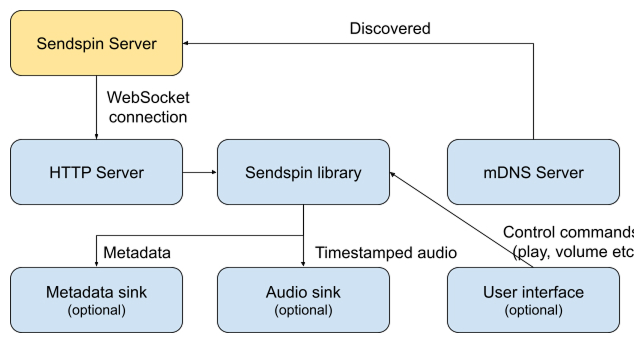
A client has four components: an mDNS advertisement (_sendspin._tcp with the path TXT record), a small WebSocket server for servers to connect to, the Sendspin core (handshake, messages, time filter), and your sinks: the audio output, and a display or lights if you have them. The SDK is the core and, in sendspin-cpp, the WebSocket server; the advertisement and the sinks are yours.
Spec: Server Initiated Connections, Encryption.
3. Identity and what to persist
Decide on persistent storage before anything else, because several things must survive a reboot:
- The X25519 keypair. The
client_idis derived from it, so regenerating the key makes the device a stranger to every server that knew it. - Pairing records, at least five. When all slots are full, evict the least recently used; a pairing never fails for lack of space.
- Volume and mute.
- Output delay, one per output if the output can change.
- The pairing failure counter (see rounds).
- The last-playback server_id, which decides between two idle servers.
In sendspin-cpp all of this goes through your SendspinPersistenceProvider.
Spec: Identities, Pairing Records, Multiple servers.
4. Announce what you can do
client/hello is where the server learns what it is talking to. List your roles in preference order. List formats with flac or pcm present so every server can serve you; Opus is optional and carries third-party patent licensing for commercial hardware. A player that cannot switch sample rates without a gap should list one rate and let the server resample. Fill in device_info with manufacturer, model and firmware version. Send the MAC address only when you have a deliberate reason: it is a stable identifier. Add a name, your current unpaired_access setting and the pairing methods you offer.
Spec: client/hello, player@v1 support object.
5. Let the clock converge before you say you are available
Run the time filter from the moment the connection is up. The reference implementation is a Kalman filter you can use as is, and a burst of about eight time exchanges every ten seconds is the known-good baseline. Do not report available: true until the filter has converged; a player that starts early plays out of sync and then corrects audibly. sendspin-cpp runs the filter for you.
Spec: Clock Synchronization.
6. Report timing parameters honestly
Two numbers in your player state tell the server how far ahead to send. required_lead_time_ms is measured from the start trigger to the first chunk you can play in full; it is often lower for a stream/clear on a warm pipeline than for a cold stream/start, and you may lower it while a stream runs. min_buffer_ms comes from the upper tail, around the 95th percentile, of the arrival-delay distribution, measured over a window long enough to include interference, and debounced so it does not jump on every blip. Report the lowest values that reliably avoid underruns. Padding these numbers adds latency for every listener, which is especially noticeable with live sources such as a turntable or a TV.
Spec: client/state player object, Server Audio Send Constraints.
7. Set the static output delay
Everything after the point where you measure playback (DSP, amplifier, DAC chain, external speakers) that you know about goes in as a default output_delay_ms. Let the user adjust it between 0 and 5000 ms, persist it, and keep separate values if the output can change. Delays before the port, such as your own audio buffers, are yours to compensate internally. Decreasing the delay can temporarily leave more audio buffered than you advertised; stay operational and drop quietly if you must.
Spec: client/state player object.
8. Stay in sync
Measure the error at the output against the time filter's prediction, not against arrival time. Corrections must be inaudible, playback speed must stay within ±0.5%, the error must stay within ±1 ms and you should aim for ±0.5 ms. Drop chunks that are already late. Snap to position in one shot on startup and after an underrun instead of sliding in. The specification describes a sample drop and insert strategy that needs no interpolation and suits small CPUs; ASRC is the higher-quality alternative when you have the cycles.
Chunks that are partly late
When a chunk's start is already in the past but its tail is still playable, decoding it and dropping only the late prefix keeps the codec state continuous. Discarding the whole chunk is simpler but costs more audio.
In sendspin-cpp your on_audio_write callback receives corrected PCM; the library does the measurement and correction.
Spec: Sync Accuracy, Correction Quality, Suggested correction strategy.
9. Volume
Volume is perceived loudness. Convert it to amplitude with (volume / 100)^1.5 and apply changes over a short ramp. Mute is independent of volume: a volume command never unmutes. A hardware knob you cannot drive remotely is reported in state but left out of supported_commands, so the server shows it read-only.
Spec: Player messages, client/state player object.
10. Yield to and reclaim from other sources
Report available: false only while you will not yield: HDMI in use, a Bluetooth session, another protocol owning the output. If Sendspin could take the device back at any moment, stay available and send client/leave instead so you stop taking part in the group. Keep processing stream/start, stream/clear and stream/end while unavailable; they may have crossed your update on the wire. A device that is also a source, such as a TV, never plays its own input locally; it plays only what the server sends back.
Spec: External Source Handling, Source messages.
11. Disconnect politely and reconnect sensibly
Send client/goodbye with the reason that fits: another_server when you switch, shutdown when you power off, restart when you will be back, user_request when the user disconnected you. On server-initiated setups the server reconnects. On client-initiated setups, after a lost connection reconnect with exponential backoff, starting at one second and doubling to a 30 second cap, with no limit on retries. Back off after a Noise failure too.
Spec: client/goodbye.
12. Power an attached amplifier from playback state
group/update tells you whether your group is playing. Switch the amplifier on when it is and off after a vendor-chosen idle time.
Spec: group/update.
13. Factory reset
A factory reset restores what you manufactured the device with (identity keypair, pairing PSK, static pairing code, calibrated output delay) and clears everything accumulated since, pairing records included.
Spec: Definitions.
14. Before you ship
- Identity survives a reboot and a power loss.
- Pairing records survive a reboot.
- The player converges before it reports available.
- No audible warble at startup or after a seek.
- Stays within ±1 ms of a reference player (sendspin-cpp-cli) over an hour.
- Survives a server restart and a network drop, and comes back without help.
- Output delay persisted and adjustable.
- Volume curve follows the formula; mute and volume are independent.
- Passes the conformance suite.
- Trademark use checked against licensing and trademarks.